The problem to solve
Creating an invoice involves entering details, looking up the company and checking individual fields. Incoming receipts add more manual entry to expense records.
Doklad.ai / Invoicing · web application
Describe what you want to invoice. The app prepares a draft for review, fills in company details and reads receipt data.
Visit Doklad.ai ↗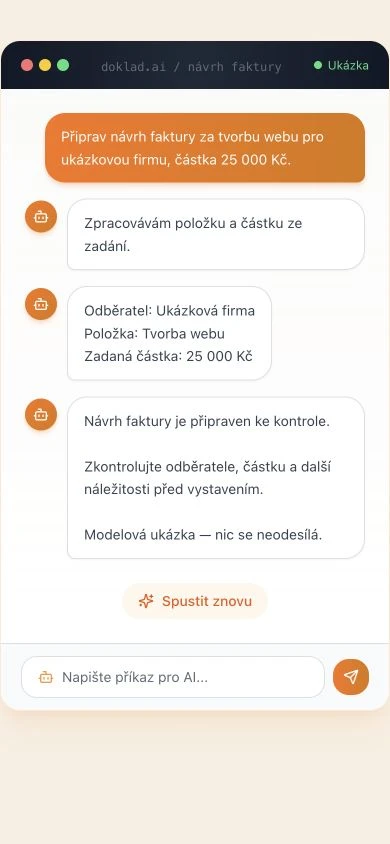 Enlarge preview ⤢
Doklad.ai in practice / Illustrative example
“Draft an invoice for website development for a sample company, amount CZK 25,000.”
The assistant identifies the item and amount. The application connects to the Czech ARES register to fill in company details.
Continue with the prepared “Website development” item and the specified amount. Check the customer, price and remaining invoice details.
A simplified scenario using sample data. It illustrates the application workflow; it is not a measured client result.
Scope of our work
Creating an invoice involves entering details, looking up the company and checking individual fields. Incoming receipts add more manual entry to expense records.
We connected an AI assistant to invoicing, expense records and ARES. It processes plain-language requests or uploaded documents. The app fills in company details and prepares a document for review.
Users can start with a simple sentence or an uploaded receipt, then continue with prepared data in invoicing or expense records. Document review remains part of the process.
OpenAI GPT-5 processes requests and reads image inputs. GPT-5 mini handles selected lighter tasks. ARES supplies company details; application logic controls permissions and document handling.
Illustrative estimate
If you process 100 documents a month, manual preparation takes 5 minutes and checking a prepared draft takes 2 minutes, the difference is 5 working hours a month.
100 documents × (5 − 2 minutes) = 300 minutes = 5 hours
An illustrative calculation, not a measured Doklad.ai result. Adjust the assumptions to your business. It excludes exceptions and implementation.
Estimate the potential for your business ↗How the work moves forward
A simplified overview of the application workflow.
Let’s find a useful starting point
Describe one task and the tools you use. A few sentences are enough to start the conversation.
Project calls are in English. We can translate written materials.
Tanduva is operated by TANDEM DIGITAL SOLUTIONS FZC LLC · License 2621421258888